Updating from Capacitor 8 to Capacitor 9
In this guide, you'll find steps to update your project to the current Capacitor 9 version as well as a list of breaking changes for our official plugins.
This guide covers app-level changes. If you maintain a Capacitor plugin, see the "Updating plugins to 9.0" guide instead.
Cordova support is now optional
Capacitor's Cordova compatibility layer is now only included in your app when your project actually has a Cordova plugin installed. Previously, the native Cordova runtime (the capacitor-cordova-android Gradle module and plugins module on Android, and the CapacitorCordova CocoaPods pod / SPM product on iOS) was always bundled into every app, whether or not it used any Cordova plugins.
Running npx cap sync (or update) now detects whether any installed plugin is a Cordova plugin and only wires in the Cordova runtime when one is found. If your project has no Cordova plugins, you'll notice:
- On Android, the generated
settings.gradleand appbuild.gradleno longer include thecapacitor-cordova-android/capacitor-cordova-android-pluginsmodules. - On iOS,
CapacitorCordovais no longer added to yourPodfileorPackage.swift.
There is currently no configuration option to force-include the Cordova runtime when no Cordova plugin is present. If your app's native code (or a plugin you maintain) directly references symbols from Capacitor's Cordova compatibility layer — for example com.getcapacitor.cordova.CordovaPlugin on Android, or anything from the CapacitorCordova pod/product on iOS — without having an actual Cordova plugin installed, those references will fail to resolve after upgrading. Add a Cordova plugin dependency (even a trivial one) if you need the layer present, or remove the direct reference.
Breaking changes in @capacitor/cli
cap run's separate live-reload flags (--live-reload/-l, --host, --port, --https) have been merged into a single --url flag. Instead of:
npx cap run android -l --host 192.168.1.181 --port 5173
pass the full URL your dev server printed (Vite, webpack, etc.) directly:
npx cap run android --url http://192.168.1.181:5173
NodeJS 24+
Capacitor 9 requires NodeJS 24 or greater. (Latest LTS version is recommended.) Node 24 also comes with npm 11 by default, as opposed to npm 10 with Node 22.
Using the CLI to Migrate
Capacitor 9 hasn't reached general availability yet, so install the next version of the Capacitor CLI to your project (once 9.0.0 is generally available, use @latest instead):
npm i -D @capacitor/cli@next
Once installed, simply run the following to have the CLI handle the migration for you.
npx cap migrate
If any of the steps for the migration are not able to be completed, additional information will be made available in the output in the terminal. The steps for doing the migration manually are listed out below.
Breaking changes in @capacitor/android
androidx.core:core 1.19.0 folds core-ktx into itself, and AGP 9 bundles the Kotlin Gradle Plugin natively while Gradle 9 fully removes jcenter(). These rarely affect an app directly, unless you (or an old/community plugin) still pin an old core-ktx version, apply Kotlin standalone, or reference jcenter() — see Migrate core-ktx to core and Update Kotlin and remove jcenter() below.
Breaking changes in @capacitor/ios
If you're updating from Capacitor 8.4 or earlier, you also need to adopt the iOS UIScene lifecycle, which Xcode 27 requires — see Updating to 8.5 for the full steps. Apps already on 8.5 have nothing further to do here.
iOS
The following guide describes how to upgrade your Capacitor 8 iOS project to Capacitor 9.
Upgrade Xcode
Capacitor 9 requires Xcode 27 or newer.
Raise iOS Deployment Target
Do the following for your Xcode project: select the Project within the project editor and open the Build Settings tab. Under the Deployment section, change iOS Deployment Target to iOS 16.0. Repeat the same steps for any app Targets.
Then, if the project is using CocoaPods, open ios/App/Podfile and update the iOS version to 16.0:
platform :ios, '16.0'
Replace @UIApplicationMain with @main
Swift 6 (bundled with Xcode 27) rejects the deprecated @UIApplicationMain attribute. If your AppDelegate.swift still declares it, replace it with @main:
-@UIApplicationMain
+@main
class AppDelegate: UIResponder, UIApplicationDelegate {
CocoaPods Trunk is expected to become read-only on December 2, 2026. If you haven't already, consider migrating your app to SPM, which is the default for new Capacitor projects.
Android
The following guide describes how to upgrade your Capacitor 8 Android project to Capacitor 9.
Upgrade Android Studio
Capacitor 9 requires Android Studio 2025.3.3 or newer.
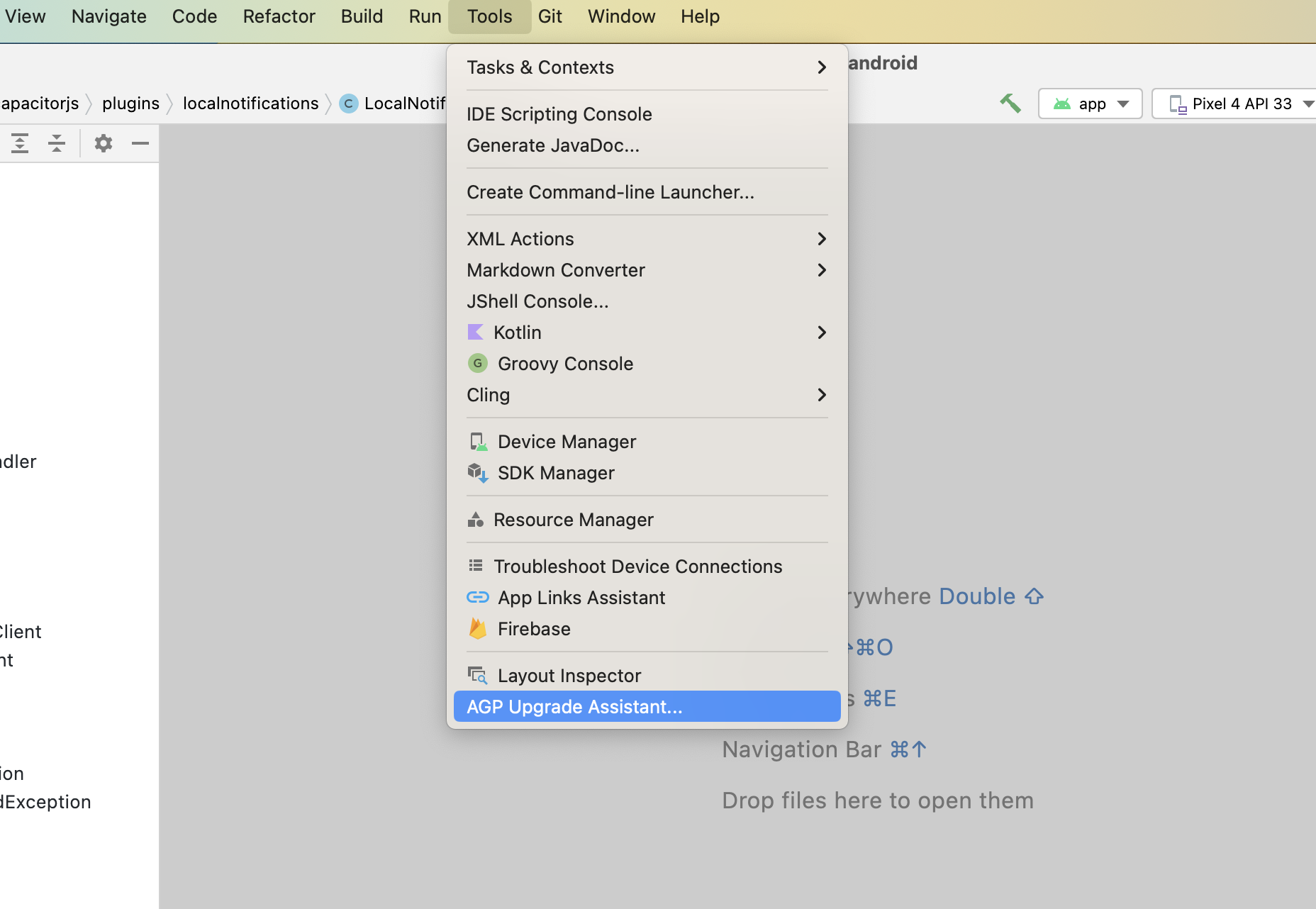
Once it's updated, Android Studio can assist with some of the updates related to gradle. To start, run Tools -> AGP Upgrade Assistant and choose 9.2.1 as the version to update on dropdown. Then click Run selected steps.
Update Android Project Variables
In your variables.gradle file, update your values to the following new minimums
minSdkVersion = 26
compileSdkVersion = 37
targetSdkVersion = 37
androidxActivityVersion = '1.13.0'
androidxAppCompatVersion = '1.7.1'
androidxCoordinatorLayoutVersion = '1.3.0'
androidxCoreVersion = '1.19.0'
androidxFragmentVersion = '1.8.9'
coreSplashScreenVersion = '1.2.0'
androidxWebkitVersion = '1.16.0'
junitVersion = '4.13.2'
androidxJunitVersion = '1.3.0'
androidxEspressoCoreVersion = '3.7.0'
cordovaAndroidVersion = '15.0.0'
Remove targetSdkVersion from your app's build.gradle
AGP 9 infers targetSdkVersion from compileSdkVersion when it isn't set explicitly, therefore you can remove it:
defaultConfig {
    applicationId "com.getcapacitor.app"
    minSdkVersion rootProject.ext.minSdkVersion
-   targetSdkVersion rootProject.ext.targetSdkVersion
    versionCode 1
    versionName "1.0"
}
Rename the default ProGuard file
AGP 9 removed proguard-android.txt. In your app/build.gradle, replace it with proguard-android-optimize.txt, which also enables ProGuard optimizations:
buildTypes {
    release {
        minifyEnabled false
-       proguardFiles getDefaultProguardFile('proguard-android.txt'), 'proguard-rules.pro'
+       proguardFiles getDefaultProguardFile('proguard-android-optimize.txt'), 'proguard-rules.pro'
    }
}
Migrate core-ktx to core
androidx.core:core 1.19.0 merges every extension function previously shipped in core-ktx into core itself, turning core-ktx into an empty compatibility artifact. If your app (or an old/community plugin it depends on) still explicitly depends on core-ktx with a version older than 1.19.0, you may hit a duplicate class error at build time; remove it, or depend on core instead:
dependencies {
-   implementation "androidx.core:core-ktx:1.17.0"
+   implementation "androidx.core:core:1.19.0"
}
Update Kotlin and remove jcenter()
AGP 9 bundles the Kotlin Gradle Plugin natively (Kotlin 2.2.10) instead of requiring it to be applied as a separate plugin. If your build.gradle still applies kotlin-android directly or declares a standalone kotlin-stdlib/kotlin-gradle-plugin dependency, remove them — keeping them alongside AGP 9's built-in Kotlin causes a duplicate-plugin build failure:
buildscript {
    dependencies {
        classpath 'com.android.tools.build:gradle:9.2.1'
-       classpath "org.jetbrains.kotlin:kotlin-gradle-plugin:2.2.20"
    }
}
-apply plugin: 'kotlin-android'

dependencies {
-   implementation "org.jetbrains.kotlin:kotlin-stdlib:2.2.20"
}
Gradle 9 also fully removes the jcenter() repository helper (redirected to Maven Central since 2024). Any build.gradle that still calls it fails at Gradle configuration time:
repositories {
    google()
-   jcenter()
+   mavenCentral()
}
Update google services plugin
# build.gradle

    dependencies {
        classpath 'com.android.tools.build:gradle:9.2.1'
-       classpath 'com.google.gms:google-services:4.4.4'
+       classpath 'com.google.gms:google-services:4.5.0'
Update gradle plugin to 9.2.1
# build.gradle

    dependencies {
-       classpath 'com.android.tools.build:gradle:8.13.0'
+       classpath 'com.android.tools.build:gradle:9.2.1'
Update gradle wrapper to 9.5.1
# gradle-wrapper.properties

distributionBase=GRADLE_USER_HOME
distributionPath=wrapper/dists
- distributionUrl=https\://services.gradle.org/distributions/gradle-8.14.3-all.zip
+ distributionUrl=https\://services.gradle.org/distributions/gradle-9.5.1-all.zip
zipStoreBase=GRADLE_USER_HOME
zipStorePath=wrapper/dists
Plugins
Plugins have been updated to version 9.0.0, make sure to update them to use latest version.
The following plugin functionality has been modified or removed. Update your code accordingly.
Action Sheet
androidxMaterialVersionvariable has been updated to1.14.0.
Barcode Scanner
kotlinxCoroutinesVersionvariable has been updated to1.11.0.
Browser
androidxBrowserVersionvariable has been updated to1.10.0.
Camera
androidxExifInterfaceVersionvariable has been updated to1.4.2.androidxMaterialVersionvariable has been updated to1.14.0.
Geolocation
playServicesLocationVersionvariable has been updated to21.4.0.kotlinxCoroutinesVersionvariable has been updated to1.11.0.
Google Maps
kotlinxCoroutinesVersionvariable has been updated to1.11.0.googleMapsPlayServicesVersionvariable has been updated to20.0.0.googleMapsUtilsVersionvariable has been updated to5.0.0.googleMapsKtxVersionandgoogleMapsUtilsKtxVersionvariables have been updated to6.0.1.
InAppBrowser
androidxBrowserVersionvariable has been updated to1.10.0.
Push Notifications
The deprecated alert presentation option is no longer supported on iOS. Use banner and/or list instead.
Splash Screen
The default value of launchFadeOutDuration on Android has changed from 200 to 0, since the previous default could block UI changes made immediately after SplashScreen.hide(). If your app relies on the previous 200ms fade-out animation, set launchFadeOutDuration: 200 explicitly in your Capacitor config.